Jul 15, 2024 • 18 min readWhat is a Credential Stuffing Attack?Any business that has a sign-in page can become a victim of a credential stuffing attack. Read this article to find out how to protect yourself from it!
Clone phishing is a cyberattack where criminals create an exact or near-exact copy of a legitimate website to steal user credentials, payment data, or other sensitive information. These cloned sites are designed to look identical to trusted brands, making them highly effective for phishing attacks and account compromise.
This guide explains how clone phishing works, how to detect cloned websites using manual and automated phishing detection methods, and how to take them down through effective phishing site takedown processes.
The attack exploits user trust by replicating familiar digital interfaces and redirecting victims to a fraudulent environment.
Clone phishing typically operates through two main vectors: cloned emails and cloned websites. Email-based cloning is often used as a delivery mechanism, where victims receive messages that appear legitimate but contain links to malicious pages. However, website cloning is the more dangerous component, since it is the point where credential theft actually occurs.
The scale of clone phishing activity remains consistently high. According to the APWG Phishing Activity Trends Report (Q1 2026), researchers identified 971,181 unique phishing attacks during a single quarter, a 13.8% increase compared to the previous quarter. New phishing websites appear continuously across the internet, and many remain active only briefly. Research on phishing infrastructure suggests that the median lifetime of a phishing site may be as little as 5.46 hours before it is removed or abandoned.
Website cloning attacks rely on replicating legitimate web properties to create fraudulent versions that visually and functionally mimic trusted brands. Unlike traditional breaches, attackers do not need to compromise backend systems. Instead, they take advantage of publicly accessible content and exploit user trust.
Attackers typically use two main approaches: automated cloning of existing websites or manual reconstruction from scratch.
HTML cloning involves automatically copying the structure and assets of a legitimate website, including HTML, CSS, JavaScript, images, and UI components, and hosting them on an attacker-controlled domain. Attackers commonly use tools such as HTTrack (an open-source website copier), wget --mirror, Selenium-based scrapers, and headless browsers to replicate entire website structures. These tools make it possible to duplicate layouts, login forms, and visual elements with minimal effort.
While backend logic is not copied, it is not required for the attack. The cloned frontend is sufficient to capture sensitive user inputs such as usernames, passwords, and payment information.
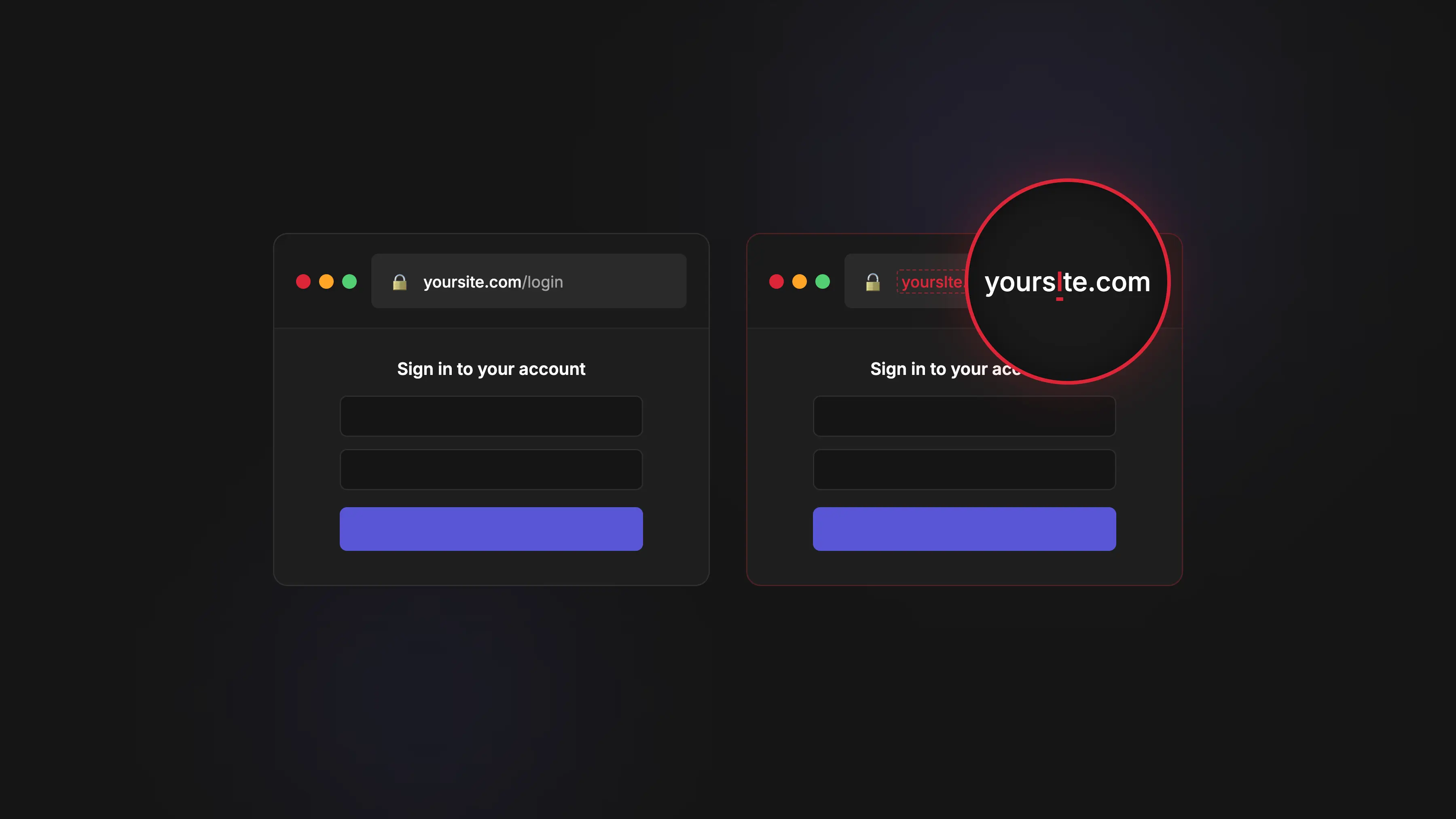
A typical scenario involves cloning an e-commerce or SaaS platform and hosting it on a lookalike domain created using typosquatting or character substitution techniques. Victims are then redirected to these domains through phishing emails, SMS messages, or malicious advertisements, unknowingly entering credentials into a fake interface.
Modern campaigns increasingly leverage AI tools to enhance cloning accuracy. Large language models are used to clean up copied content, translate interfaces, fix layout inconsistencies, and slightly modify page structure to evade signature-based detection systems. This significantly increases the difficulty of traditional website cloning detection methods.
Detection is typically performed using DOM similarity analysis, content fingerprinting, and visual page comparison. However, attackers frequently introduce minor modifications to reduce similarity scores and evade automated detection systems. Despite these challenges, HTML cloning remains classified as a medium-difficulty detection scenario, since structural overlap often still exists between original and cloned pages.
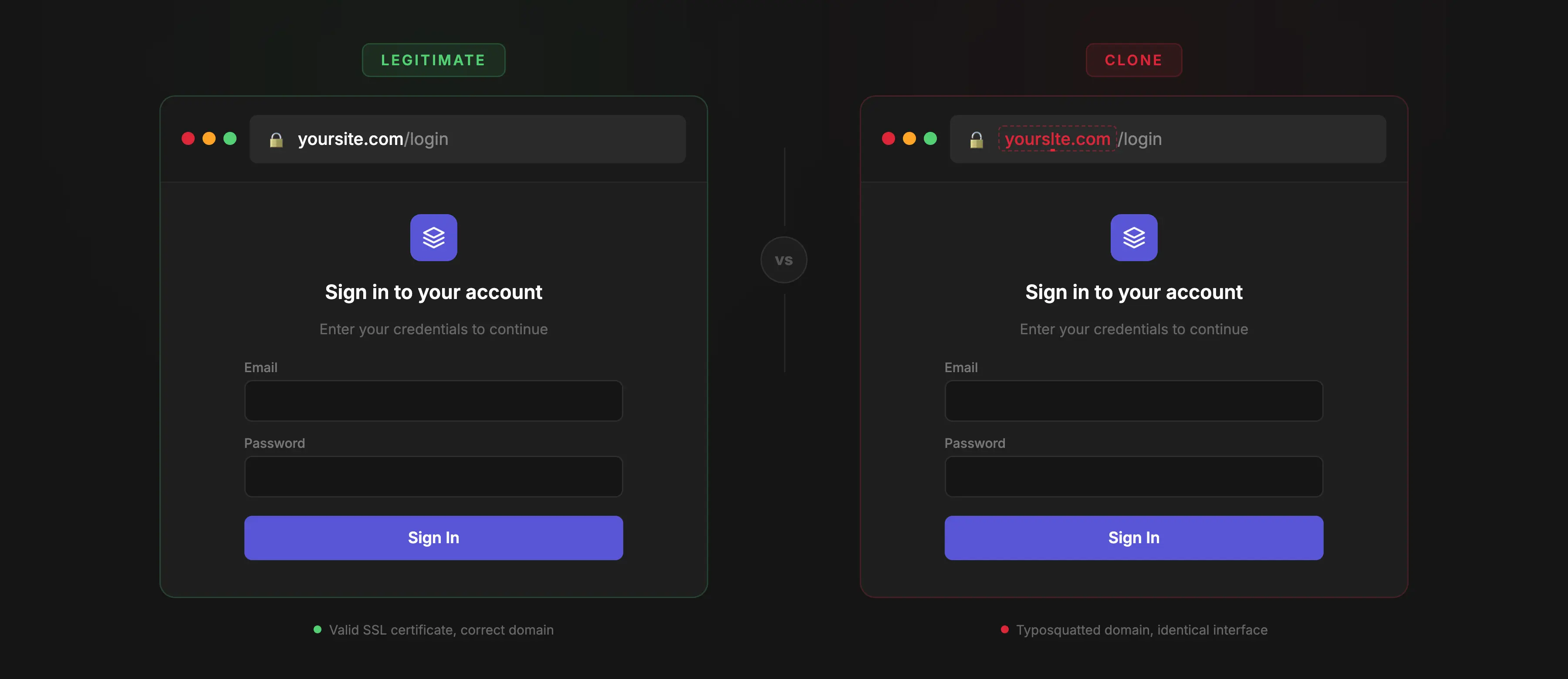
In this approach, attackers do not copy website code. Instead, they manually recreate the user interface of a legitimate brand by visually replicating logos, typography, colors, and layout patterns. This method is commonly used against high-value targets such as banks, payment providers, and SaaS platforms, where users are highly familiar with interface design and are more likely to trust visual consistency. A common example includes a fake login page hosted on domains such as bank-secure-login.com, or variations that include trust-building keywords like "secure", "login", or "verify".
From a detection standpoint, these attacks are significantly more difficult to identify because there is no shared codebase with the original website. As a result, traditional code-based detection methods are ineffective. Instead, detection relies on visual similarity models, brand monitoring systems, and behavioral analysis of page interactions.
| Method | How It Works | Tools Used | Detection Difficulty | Example |
|---|---|---|---|---|
| HTML Cloning | Automatically copies website code and assets | HTTrack, wget --mirror, Selenium, headless browsers | medium | Cloned SaaS login page hosted on typo domain |
| Built From Scratch | Manually recreates UI without copying code | HTML/CSS editors, AI-assisted design tools | high | Fake banking login page on lookalike domain |
A clone phishing attack follows a structured and highly repeatable chain designed to maximize user trust, credential capture, and downstream monetization. While the delivery methods vary, the core lifecycle remains consistent across most campaigns.
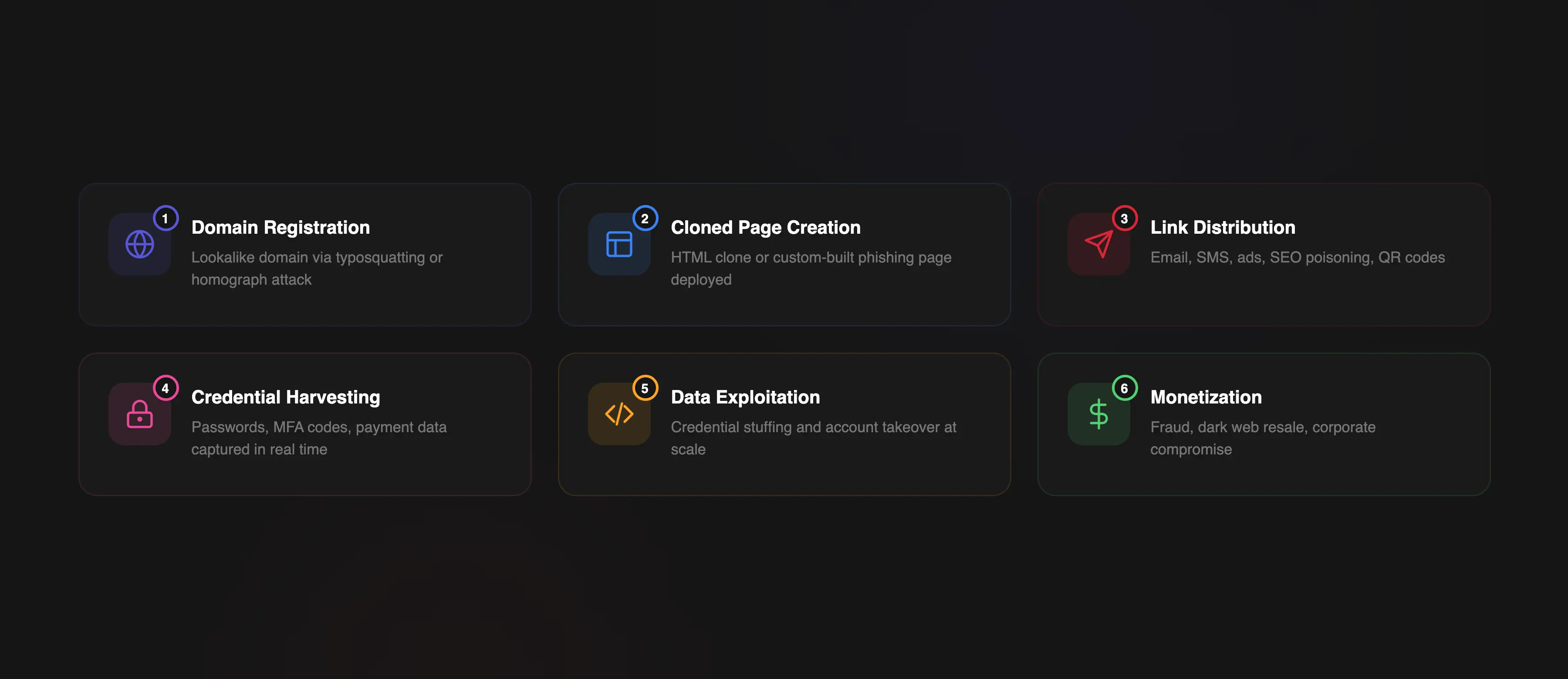
Attackers begin by registering a domain that closely resembles a legitimate brand. This often involves typosquatting, homograph attacks, or the use of trust-related keywords such as "secure", "login", or "verify" to increase perceived legitimacy.
Next, attackers deploy a cloned or manually built phishing website. Depending on the approach, this may involve HTML cloning tools or fully custom-built interfaces designed to visually replicate the target brand.
Once the phishing page is live, attackers distribute malicious links through multiple channels, including phishing emails, SMS messages, social media platforms, paid ads, SEO poisoning, shortened URLs, and QR codes (quishing). These methods help obscure the final destination and increase click-through rates.
Victims are redirected to the cloned website and prompted to enter sensitive information such as usernames, passwords, MFA codes, or payment details. This data is captured in real time and transmitted to attacker-controlled infrastructure.
Stolen credentials are rarely used manually. Instead, they are automatically processed and injected into credential stuffing systems and account takeover (ATO) pipelines. These systems test credentials across multiple platforms at scale using bots, proxies, and automation frameworks.
Successful logins are exploited for fraud, resale, or further compromise. Credentials, session cookies, and tokens are often sold on underground markets or used directly in financial theft, identity fraud, or corporate account compromise.
Case example: Large-scale impersonation fraud. In a notable impersonation fraud, attackers posed as a hardware supplier to Google and Facebook and used fraudulent invoices to steal over $100 million. Although this was not a website cloning case, it demonstrates how brand impersonation, the same core technique used in clone phishing, can exploit established trust on a large scale.
Scale of the problem. According to the FBI Internet Crime Complaint Center (IC3) 2025 Annual Report, reported losses from internet-enabled crime exceeded $20 billion, with more than one million complaints submitted during the year. The downstream impact is amplified by automation. According to the Verizon 2025 DBIR, credential stuffing accounts for a median of 19% of all authentication attempts — driven directly by stolen credentials originating from phishing campaigns.
Key insight. The most critical aspect of clone phishing is not the initial credential theft, but what happens afterward. A single successful phishing page can trigger automated attack chains that scale into thousands of login attempts across multiple platforms within minutes.
Detecting cloned websites requires a combination of manual investigation and automated monitoring systems. Because phishing infrastructure is highly dynamic and short-lived, effective phishing detection depends on identifying early indicators across domains, content, and infrastructure before damage occurs. In practice, organizations rely on a layered detection model that combines human reporting signals with automated domain and content analysis.
Manual detection typically relies on early warning signals that appear before automated systems fully classify a threat. While not scalable on its own, it often provides the first indication of brand impersonation activity. One of the most common signals comes from user reports. Customers or employees may report suspicious emails, unexpected login pages, or visual inconsistencies in website interfaces. These reports often serve as the first indicator of an active phishing campaign.
Another effective method is monitoring brand-related search queries through tools like Google Alerts. Tracking combinations of a brand name with keywords such as "login", "account", "verify", or "password reset" can surface suspicious third-party pages that imitate legitimate services.
Monitoring domain registrations is another key manual technique. Reviewing WHOIS data for newly registered domains that resemble the brand helps identify typosquatting, homograph attacks, and combosquatting patterns early in their lifecycle.
Reverse image search can also reveal unauthorized use of logos, UI elements, and branding assets across external domains. This is especially useful for detecting cloned websites that reuse visual identity without copying underlying code.
Additionally, Certificate Transparency (CT) logs (for example via crt.sh) provide visibility into newly issued SSL certificates. Since even phishing sites frequently use HTTPS, CT monitoring can expose suspicious domains before they are widely distributed.
Despite its usefulness, manual detection is inherently reactive and does not scale. It requires continuous monitoring and human validation, making it insufficient as a standalone phishing detection strategy.
Automated detection systems form the core of modern website cloning detection strategies. Organizations looking to detect cloned websites at scale typically combine domain monitoring, content fingerprinting, visual similarity analysis, and threat intelligence feeds.
One of the primary mechanisms is domain monitoring. This involves scanning newly registered domains for patterns associated with brand impersonation, including typosquatting, homograph substitution, and combosquatting. Modern lookalike domain detection systems automatically score newly registered domains based on their similarity to legitimate brand assets and known impersonation patterns.
Another key technique is content fingerprinting. This method analyzes the structure of a webpage, including its DOM hierarchy, scripts, layout patterns, and visual components, and compares these elements with known legitimate versions of the site. Even partial similarities can indicate a cloned or modified version of a legitimate service.
Visual similarity detection is also widely used. By comparing rendered screenshots of pages, these systems can identify cloned interfaces even when underlying code has been altered or obfuscated. This is especially important for detecting custom-built phishing pages that do not reuse original code.
Email-based phishing detection also contributes indirectly through DMARC aggregate reporting. These reports help identify unauthorized email sources attempting to impersonate a brand, which is often the initial delivery vector for cloned website attacks.
Threat intelligence feeds further enhance detection by providing continuously updated lists of known phishing domains and URLs. Sources such as PhishTank and OpenPhish help organizations block previously identified malicious infrastructure and reduce response time.
When selecting phishing detection solutions, organizations typically evaluate coverage of attack types (HTML clones versus custom-built phishing pages), detection speed, false positive rates, lookalike domain detection capabilities, and the level of automation available in response workflows.
Taking down a cloned phishing website requires a coordinated response across hosting providers, domain registrars, security platforms, and threat intelligence networks. Because phishing infrastructure is typically short-lived, the primary objective is to minimize exposure time and reduce the window for credential theft.
Effective phishing site takedown processes follow a structured escalation model, starting from evidence collection and moving toward automated and legal enforcement mechanisms.
The first step is to preserve all relevant evidence of the phishing activity. This includes URLs, full-page screenshots, HTML source code, HTTP response headers, timestamps, and any redirect chains leading to the malicious page. Additional technical artifacts such as WHOIS records, IP addresses, and SSL certificate details should also be recorded. This documentation is critical for abuse reports and downstream escalation.
The next step is identifying the hosting provider responsible for the phishing site. This is typically done through WHOIS lookup, DNS resolution, reverse IP analysis, and ASN mapping. In more complex cases, attackers use CDN services or reverse proxies to obscure the origin server. In these situations, passive DNS data and historical resolution records can help identify the actual hosting infrastructure.
Once the hosting provider is identified, an abuse report should be submitted immediately. Most providers maintain dedicated channels for phishing-related incidents.
A strong report should include:
Well-structured reports significantly reduce response time, and in many cases, automated systems can temporarily suspend the domain before manual review.
If the hosting provider does not respond, the next escalation point is the domain registrar. Many registrars enforce strict anti-abuse policies and support expedited takedown for phishing cases. For campaigns involving domain hopping (frequent re-registration of similar domains), continuous monitoring and repeated escalation may be required.
Submitting the phishing URL to Google Safe Browsing helps trigger browser-level warnings in Chrome, Firefox, and other supported browsers. This step does not remove the site, but it significantly reduces traffic by warning users before they access the page.
The phishing URL should also be reported to threat intelligence ecosystems such as PhishTank, OpenPhish, APWG (reportphishing@apwg.org), and relevant national CERT organizations. This ensures broader propagation of detection signals across security vendors and downstream protection systems.
Organizations facing repeated phishing campaigns often supplement internal response efforts with a specialized phishing takedown service. These providers help automate evidence collection, abuse reporting, registrar escalation, and ongoing monitoring of newly registered impersonation domains.
When phishing domains violate trademarks or impersonate registered brands, legal escalation mechanisms such as DMCA takedown notices or UDRP complaints can be used. Although slower than technical takedown methods, legal processes are often the most durable option for persistent or repeat attackers.
Response time reality:
The key challenge is that phishing sites often operate in a "hit-and-run" model, where they remain active only for a few hours while actively harvesting credentials.
While takedown processes are in progress, organizations must focus on minimizing user impact, preventing account compromise, and reducing the window of opportunity for credential theft.
Key mitigation actions include:
On the infrastructure side, additional controls can be applied:
In some cases, organizations can embed defensive logic into frontend assets that are frequently copied during website cloning attacks. If these assets are loaded by a cloned phishing page, they may display user warnings, redirect visitors to the legitimate website, or generate telemetry indicating unauthorized use of the application.
Clone phishing does not end when credentials are stolen. Modern cybercriminal infrastructure is highly industrialized, and stolen data is immediately processed, validated, and monetized through automated pipelines designed for large-scale exploitation.
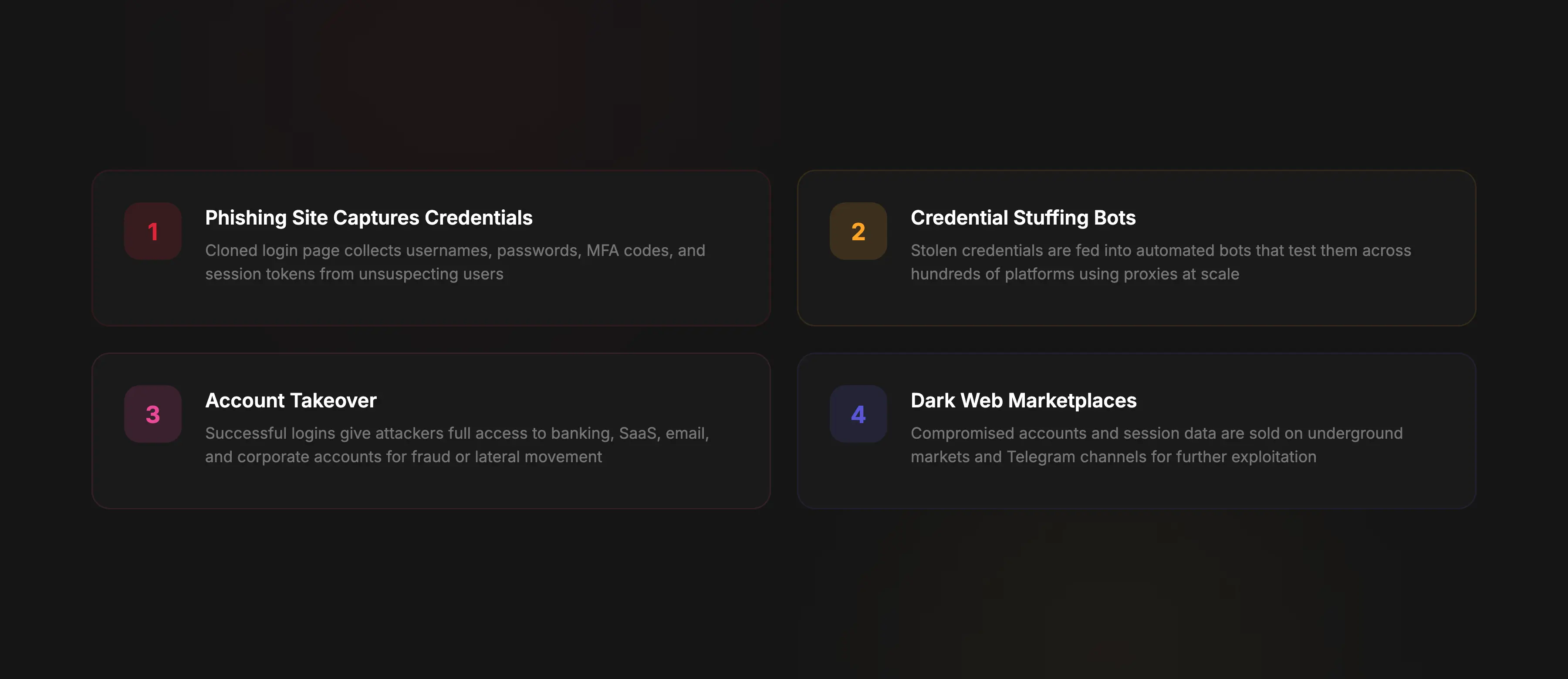
The first stage of post-phishing exploitation is credential stuffing. Automated bots take stolen username and password pairs and test them across multiple platforms, including banking systems, SaaS applications, and e-commerce services.
Learn more about this attack technique in our guide to credential stuffing attacks.
This process relies heavily on password reuse, which significantly increases the success rate of automated login attempts. Large distributed bot networks, proxy infrastructure, and automation frameworks are typically used to scale these attacks.
When credentials match active accounts, attackers gain full access through account takeover (ATO). Depending on the target system, this may include access to financial data, personal information, administrative panels, or corporate environments.
For a deeper look at how attackers exploit compromised accounts, see our guide to account takeover.
In more advanced scenarios, attackers also exploit session tokens or cookies if they were captured during the phishing process, enabling bypass of traditional authentication mechanisms.
Stolen credentials and session data are frequently sold on dark web marketplaces and private Telegram channels. These ecosystems operate as real-time trading platforms for compromised accounts.
Pricing depends on several factors:
Prices on underground marketplaces vary widely. Basic consumer accounts may be sold for only a few dollars, while financial accounts, cryptocurrency exchange accounts, or privileged corporate access can be worth hundreds or even thousands of dollars depending on the available access and associated assets.
Credential reuse remains one of the most critical enablers of post-phishing attacks. A Cybernews analysis of 19 billion leaked passwords found that 94% were reused or duplicated, with only 6% being unique. User surveys confirm the same pattern. According to Bitwarden's 2025 research, 72% of Gen Z users reuse passwords across multiple accounts. Combined with the Verizon 2025 DBIR finding that stolen credentials were involved in 32% of all breaches, this makes a single clone phishing incident a gateway to compromise across multiple platforms.
According to the Imperva Bad Bot Report 2025, automated bots account for more than half of all internet traffic. A significant portion of this traffic is driven by credential stuffing and account takeover attempts fueled by phishing-derived data.
Once credentials enter these systems, they go through automated processing pipelines:
This industrialization of attack infrastructure means a single successful clone phishing campaign can trigger thousands of automated attacks within minutes.
Key insight. The most important risk of clone phishing is not the initial credential theft itself, but the scalability of what happens next. Once stolen credentials enter automated attack ecosystems, they can be reused across thousands of login attempts within minutes. Effective defense therefore requires protection across the entire attack lifecycle: phishing detection, phishing site takedown, credential protection, and account takeover prevention.
BotBye provides automated detection of cloned websites, brand impersonation monitoring, and phishing site takedown workflows across multiple attack vectors. But unlike most phishing protection software, BotBye doesn't stop at detection. It can act directly on the attacker's page.
On the phishing page:
On your side:
A standard takedown takes 24-72 hours. BotBye neutralizes the attack while the phishing site is still live.
Clone phishing is not a one-time incident. A single cloned website can trigger a chain of credential stuffing, account takeover, and fraud that scales within minutes. Effective protection requires covering the full attack lifecycle: detecting cloned websites early, taking down phishing infrastructure fast, and protecting users whose credentials were already exposed.
Organizations that rely solely on manual monitoring or standard takedown processes leave a gap between detection and response. BotBye closes that gap by neutralizing attacks in real time while the phishing site is still live.